
















A film scanner turns old negatives and slides into digital files that can be saved and shared. Check which film formats the scanner takes, since they differ between models. Paper and cartridges for photo printers are made for a specific printer, so choose by your model.
Read more about printers & scanners
Film scanners for negatives and slides
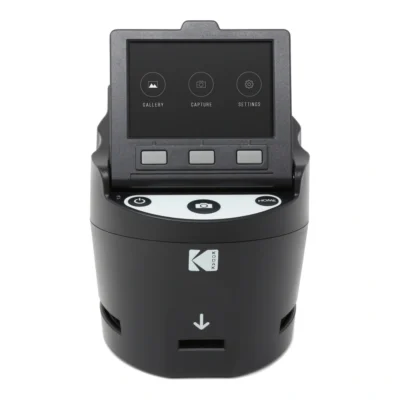
Many homes have binders of negatives and boxes of slides that nobody has looked at in decades. A film scanner turns them into digital pictures you can show on the TV, send to relatives and keep in more than one place.
Kodak's film scanners take the most common formats from the past. 135 is ordinary 35 mm film. 126 is the cartridge film with square pictures from the Instamatic cameras, and 110 is the small pocket camera film of the 1970s and 80s. The scanners also take single frames from Super 8 and 8 mm, both negatives and slides, in colour and black and white.
These scanners are built to be quick and simple. You do not need a computer. For family pictures that will be viewed on screens and in photo books, they do the job well. If you want large prints of individual frames, a professional scan of just those frames is a better choice.
How scanning works
The film or slide goes into a holder that slides into the scanner. Holders for the different formats are included. The picture appears straight away on the scanner's screen, where you can adjust brightness and colour balance before saving. Faded or discoloured pictures can be corrected to a degree, and frames that come out mirrored or upside down are put right with a button.
The pictures are saved as JPEGs to an SD card or the scanner's internal memory. The larger model has a 3.5-inch screen and connects to a TV over HDMI, which makes it nice to go through the pictures with the people who were there when they were taken.
Expect it to take time. A binder of negatives holds many hundreds of frames. Work in batches and start with the pictures that matter most.
Digitising cine film on reels
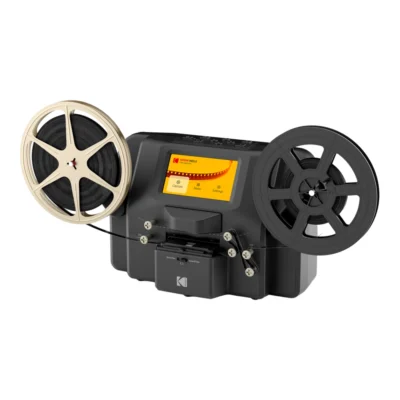
Old home movies on 8 mm and Super 8 need a different machine from stills. Kodak's reel digitiser feeds the film frame by frame past a sensor and saves the result as an MPEG-4 video file on an SD card. It takes reels from 3 to 9 inches and has a 5-inch screen where you watch the film as it runs.
Exposure can be set automatically or by hand, which helps with films that were over- or underexposed to begin with. Scanning runs at 2 frames per second and the finished file plays at 20 frames per second. One minute of film therefore takes around ten minutes to digitise, so let the machine work while you do something else.
Most home movies on cine film have no sound. If yours has a soundtrack, it will not be carried over, since the machine only reads the pictures.
Paper and cartridges for Kodak photo printers
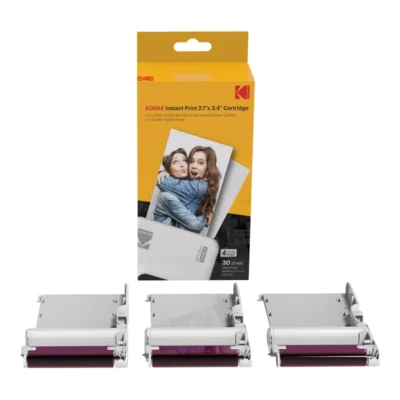
Kodak's small photo printers use dye sublimation. The colour sits in a thin film inside the cartridge and is transferred to the paper by heat, in four passes where the last one lays a protective coat over the picture. That makes the prints resistant to fingerprints, water and fading. Paper and colour come in the same cartridge, so you replace both at once.
The cartridges come in several sizes, including 5.4 x 8.6 cm, 7.6 x 7.6 cm and 10 x 15 cm, and only fit printers made for the same size. Check the format and model name of your printer before ordering.
Tips for better results
Dust on negatives turns into white specks in the pictures. Blow the film clean with a blower before putting it in the holder, and hold it by the edges, ideally wearing thin cotton gloves. Fingerprints on old film cannot be washed off at home.
Do not throw the originals away once they are scanned. Negatives and slides last for many years if kept dry and dark, and scanning technology keeps getting better. The digital files deserve the same care as any other pictures: keep them in at least two places.
Frequently asked questions about printers & scanners
How do I digitise old negatives and slides?
With a film scanner that takes your film format. The film goes in a holder, you adjust light and colour on the screen, and the pictures are saved as JPEGs on an SD card. Kodak's scanners work without a computer.
Which film formats can a film scanner handle?
Kodak's scanners take 135 (35 mm), 126 and 110, plus single frames from Super 8 and 8 mm. Check that your particular scanner has holders for the format you have.
How do I digitise 8 mm and Super 8 film?
Reels need a cine film digitiser, which feeds the film frame by frame and saves it as video. Kodak's model takes reels from 3 to 9 inches and saves MPEG-4 to an SD card. Expect around ten minutes of work per minute of film.
Which paper fits my Kodak printer?
The cartridge must match the printer's format, for example 5.4 x 8.6 cm, 7.6 x 7.6 cm or 10 x 15 cm. Paper and colour come in the same cartridge. Check the printer's model and format before ordering.
Should I keep the negatives after scanning?
Yes. Negatives and slides last a long time if kept dry and dark, and they can be rescanned with better technology later. Keep the digital files in at least two places.